Ansible manages Proxmox VE through the Proxmox API. The community.proxmox collection clones a VM from a template, sets its size and cloud-init values, grows the disk and starts it, all with an API token that has no rights beyond VMs. This article goes through the setup in order: the token, a cloud-init template, a playbook for one VM, and then where the list of VMs lives once there are more than a few. At Packetflow that list lives in NetBox, and the code for it is public.
Everything below was run on Proxmox VE 9.2 with ansible-core 2.19 and community.proxmox 2.1. The names (acme, pve01) and addresses are examples; the output and screenshots are from real runs on a lab node.
What you need
On the machine that runs Ansible:
python3 -m venv ~/.venv/pve && . ~/.venv/pve/bin/activate
pip install ansible-core proxmoxer requests
ansible-galaxy collection install community.proxmox
Older tutorials use community.general.proxmox_kvm. The Proxmox modules have moved to their own collection since, and the module names stayed the same.
1. An API token with only the rights it needs
Most examples online use root@pam with a password. A playbook that only builds VMs can do with far less. On the node, as root:
pveum role add PacketflowVM -privs "VM.Allocate VM.Audit VM.Clone \
  VM.Config.CDROM VM.Config.Cloudinit VM.Config.CPU VM.Config.Disk \
  VM.Config.HWType VM.Config.Memory VM.Config.Network VM.Config.Options \
  VM.PowerMgmt"
pveum role add PacketflowNode -privs "Sys.Audit"

pveum user add ansible@pve --comment "VMs from Ansible"
pveum user token add ansible@pve acme --privsep 0   # prints the secret once

pveum acl modify /vms --users ansible@pve --roles PacketflowVM
pveum acl modify /nodes/pve01 --users ansible@pve --roles PacketflowNode
pveum acl modify /storage/local-lvm --users ansible@pve --roles PVEDatastoreUser
pveum acl modify /sdn/zones/localnetwork/vmbr0 --users ansible@pve --roles PVESDNUser| Path | Role | What it allows |
|---|---|---|
/vms |
PacketflowVM |
read, clone, configure, resize, start and stop VMs |
/nodes/pve01 |
PacketflowNode |
Sys.Audit: the modules check that the node exists |
/storage/local-lvm |
PVEDatastoreUser |
disks of new clones and their cloud-init drives |
/sdn/zones/localnetwork/vmbr0 |
PVESDNUser |
attach network cards to the bridge |

With --privsep 0 the token has exactly the rights of its user, so keep that user out of groups that hold roles higher up the tree. pveum user permissions ansible@pve should list these four paths only. The token cannot touch storage settings, users, the firewall or the node. It can change every VM on the node, which is why the playbooks further down only touch VMs that carry their own tag.
2. A cloud-init template
A template is a stopped VM with a cloud image as its disk and an empty cloud-init drive. Ubuntu publishes such an image for every release. On the node:
cd /var/tmp
wget https://cloud-images.ubuntu.com/noble/current/noble-server-cloudimg-amd64.img
virt-customize -a noble-server-cloudimg-amd64.img --install qemu-guest-agent --truncate /etc/machine-id

qm create 9000 --name tpl-ubuntu2404 --ostype l26 --cores 2 --memory 2048 \
  --scsihw virtio-scsi-single \
  --scsi0 local-lvm:0,import-from=/var/tmp/noble-server-cloudimg-amd64.img,discard=on,ssd=1 \
  --ide2 local-lvm:cloudinit --boot order=scsi0 \
  --net0 virtio,bridge=vmbr0 --serial0 socket --vga serial0 --agent 1
qm template 9000
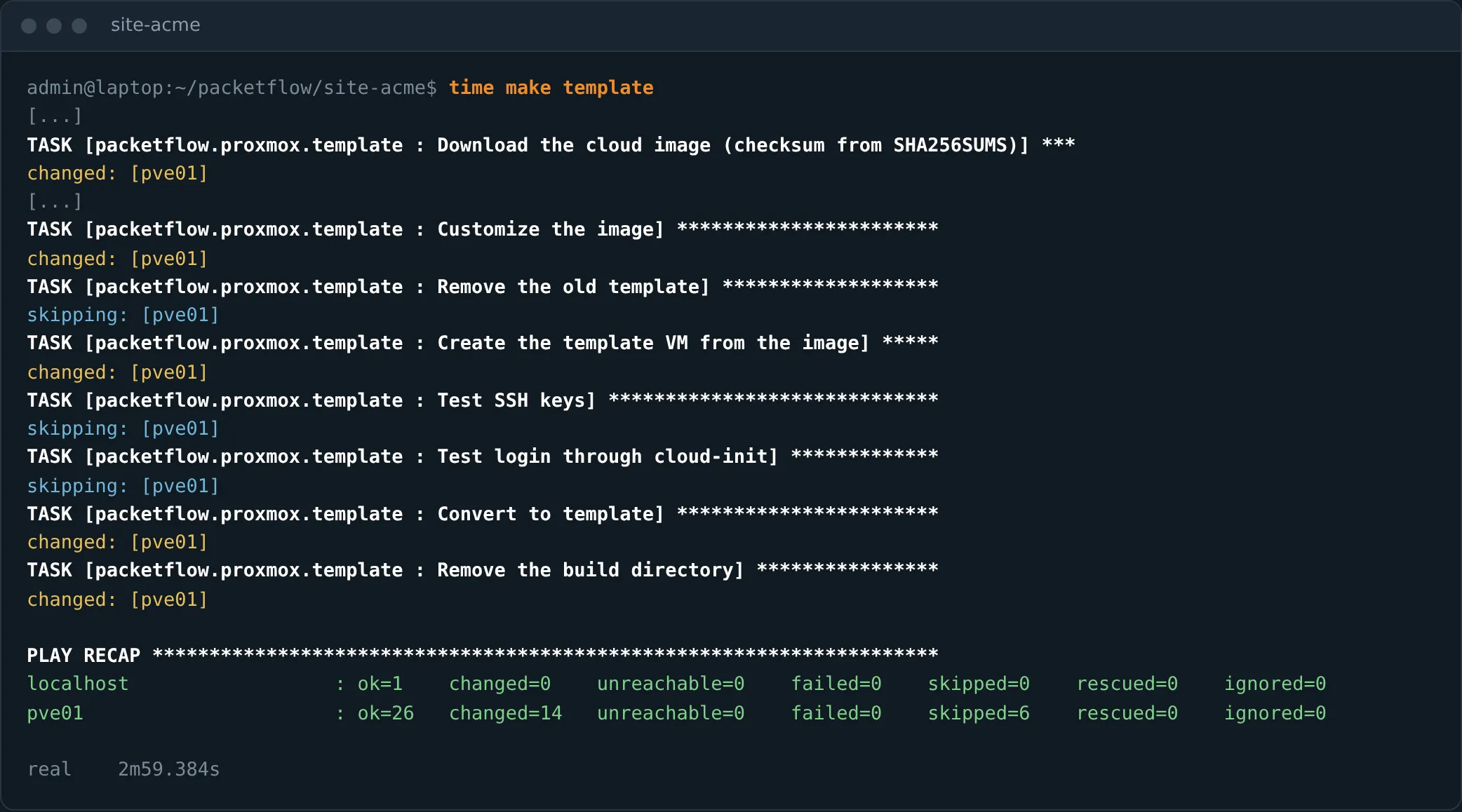
virt-customize comes with apt install libguestfs-tools and changes the image file without booting it. Here it installs the QEMU guest agent, so Proxmox VE can read the IP address of every clone and shut it down cleanly. Truncating /etc/machine-id gives each clone its own ID at first boot. import-from copies the image into the storage as the VM’s disk in the same command.
The same build as an Ansible role adds one thing: the Zabbix agent goes into the image too, with its settings, so a new VM registers itself in Zabbix at its first boot.
3. Clone a VM with a playbook
One play, four tasks. module_defaults gives every Proxmox module the same connection settings, and the token secret comes from the environment.
---
- name: One VM from a cloud-init template
  hosts: localhost
  gather_facts: false
  module_defaults:
    group/community.proxmox.proxmox:
      api_host: pve01.example.com
      api_user: ansible@pve
      api_token_id: acme
      api_token_secret: "{{ lookup('ansible.builtin.env', 'PROXMOX_TOKEN_SECRET') }}"
      validate_certs: false   # true once the node has a real certificate
  vars:
    node: pve01
    vmid: 120
  tasks:
    - name: Clone the template
      community.proxmox.proxmox_kvm:
        node: "{{ node }}"
        vmid: 9000            # the template
        clone: tpl-ubuntu2404
        newid: "{{ vmid }}"
        name: demo-web01
        full: true
        storage: local-lvm
        timeout: 300

    - name: Size, cloud-init and a tag
      community.proxmox.proxmox_kvm:
        node: "{{ node }}"
        vmid: "{{ vmid }}"
        update: true
        cores: 2
        memory: 2048
        ciuser: ansible
        sshkeys: "{{ lookup('ansible.builtin.file', '~/.ssh/id_ed25519.pub') }}"
        ipconfig:
          ipconfig0: ip=10.50.30.40/24,gw=10.50.30.1
        nameservers: [10.50.30.3]
        tags: [ansible]

    - name: Grow the disk
      community.proxmox.proxmox_disk:
        vmid: "{{ vmid }}"
        disk: scsi0
        size: 20G
        state: resized

    - name: Start
      community.proxmox.proxmox_kvm:
        node: "{{ node }}"
        vmid: "{{ vmid }}"
        state: started
export PROXMOX_TOKEN_SECRET=xxxxxxxx-xxxx-xxxx-xxxx-xxxxxxxxxxxx
ansible-playbook vm.ymlThe first run reports four changes and the VM boots with its address, user and SSH key. A second run clones nothing and resizes nothing, but the second task reports changed again: with update: true the module sends the configuration every time and cannot tell whether anything was different.
A few things to know before this grows into twenty VMs:
- A full clone of a larger template takes longer than the module’s default wait. Set
timeouton the clone. - A disk can grow and never shrink.
- Cores, memory and cloud-init values of a running VM apply at its next reboot.
- The playbook cannot say what it will do before it does it.
4. Where the list of VMs lives
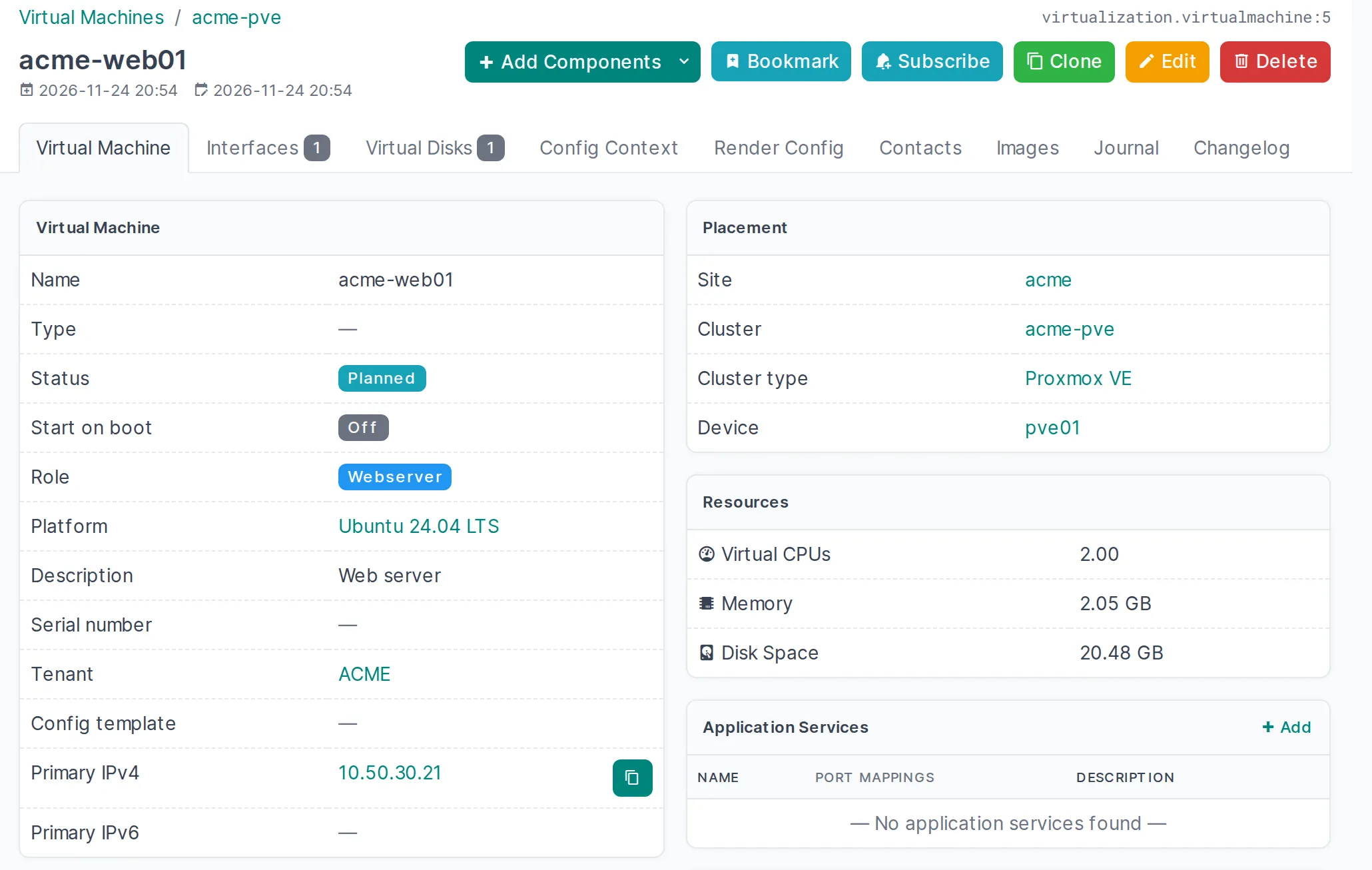
One play per VM does not scale, and a vars file with twenty VMs becomes a second inventory next to the documentation. Packetflow keeps the list in NetBox. A VM is a NetBox object with a cluster, a size, a platform, an interface and an IP address, and Ansible makes Proxmox VE match it.
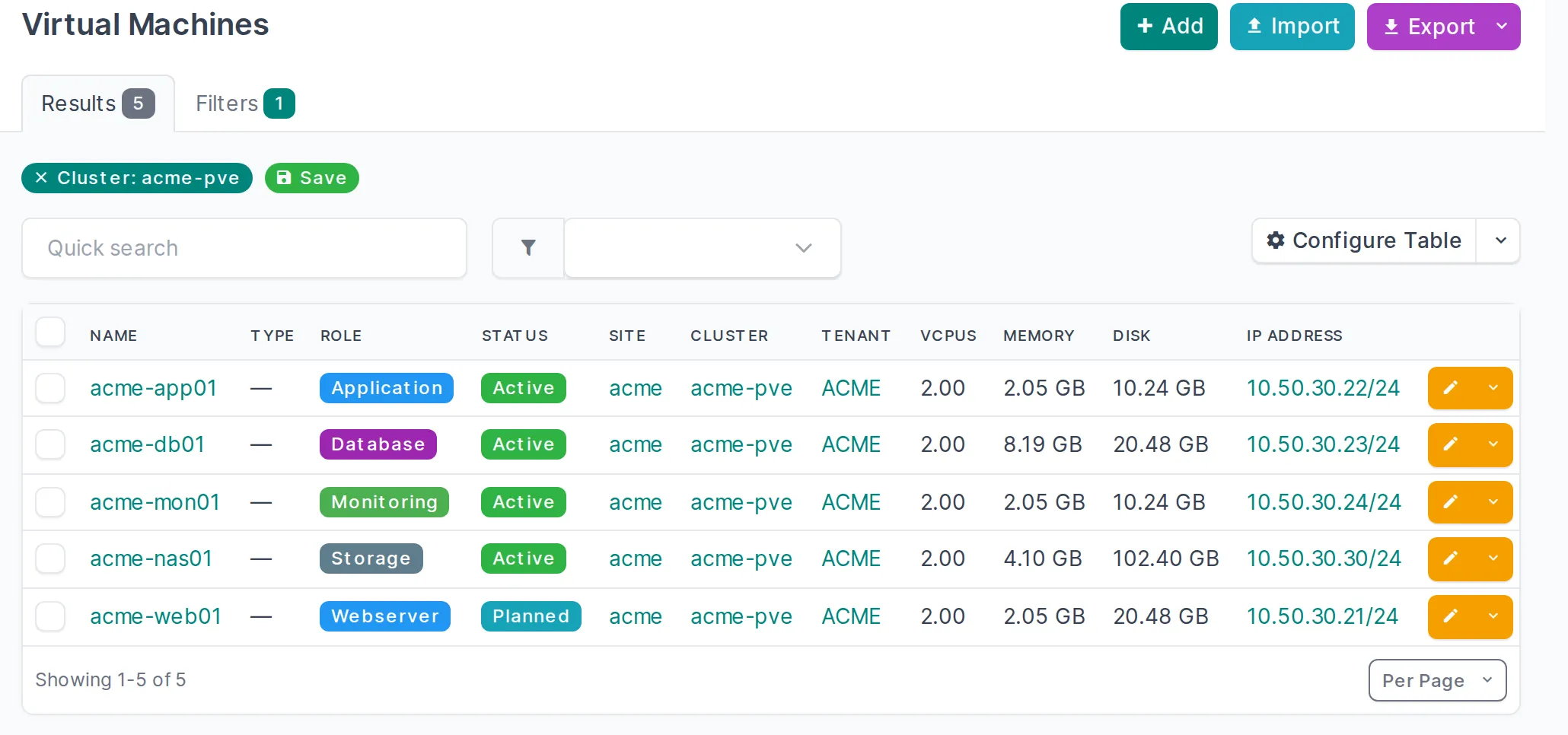
acme-web01 is new and has the status Planned. acme-db01 went from 4 to 8 GB of memory. acme-nas01 was built by hand and carries the tag unmanaged, so NetBox documents it and the automation leaves it alone.
| Proxmox VE | From NetBox |
|---|---|
| exists and runs, or is stopped | status Active, Planned or Staged, or Offline |
| VM ID | 10000 + the NetBox ID of the VM |
| node | the VM’s device |
| template | the VM’s platform |
| cores, memory, disk | vCPUs, memory, virtual disk |
| bridge and VLAN | the untagged VLAN of the VM’s interface |
| IP address, gateway, DNS | the primary IPv4, through cloud-init |
make plan reads the VMs from NetBox and from the Proxmox API, compares the two and changes nothing:
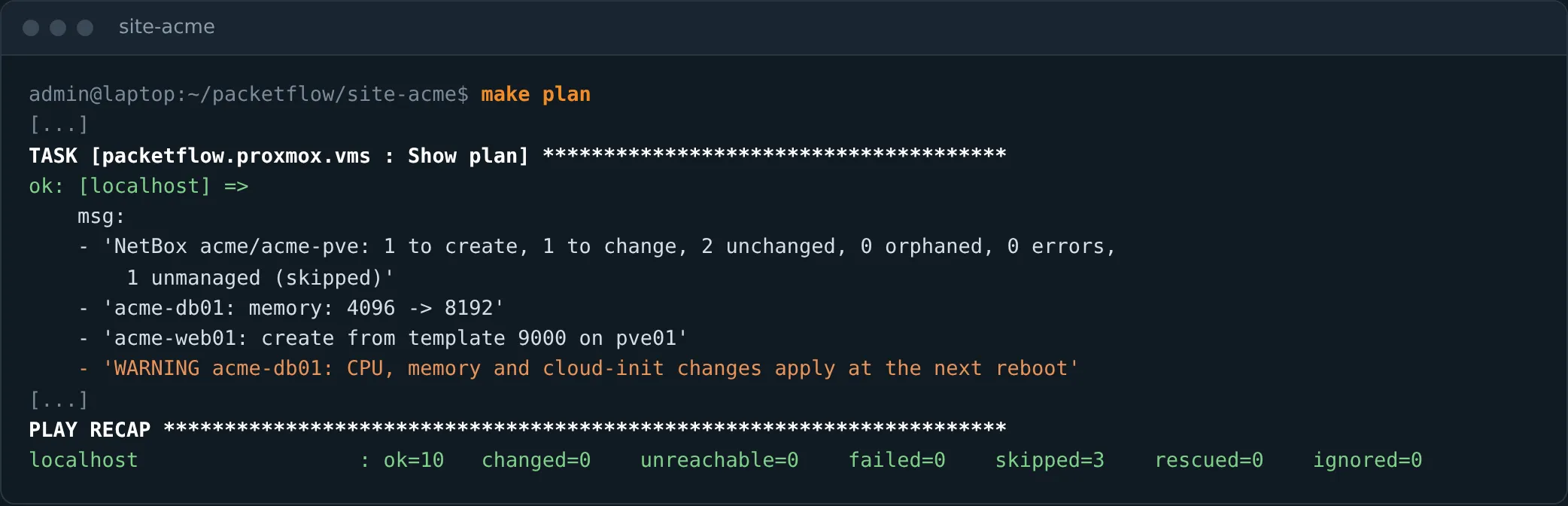
That plan is what the single playbook could not give. A missing IP address, a gateway outside the subnet or a disk that would shrink shows up in it as an error, and any error stops the run before the first change. Two more rules keep it safe on a node that holds other VMs:
- Nothing is deleted. A VM that exists in Proxmox VE and is gone from NetBox is reported as an orphan. Removing it stays a manual step, so a wrong click in NetBox never destroys a server.
- Only tagged VMs are touched. Every VM the role creates gets the tag
packetflow. Anything without it is left alone, also when its ID is in the way.
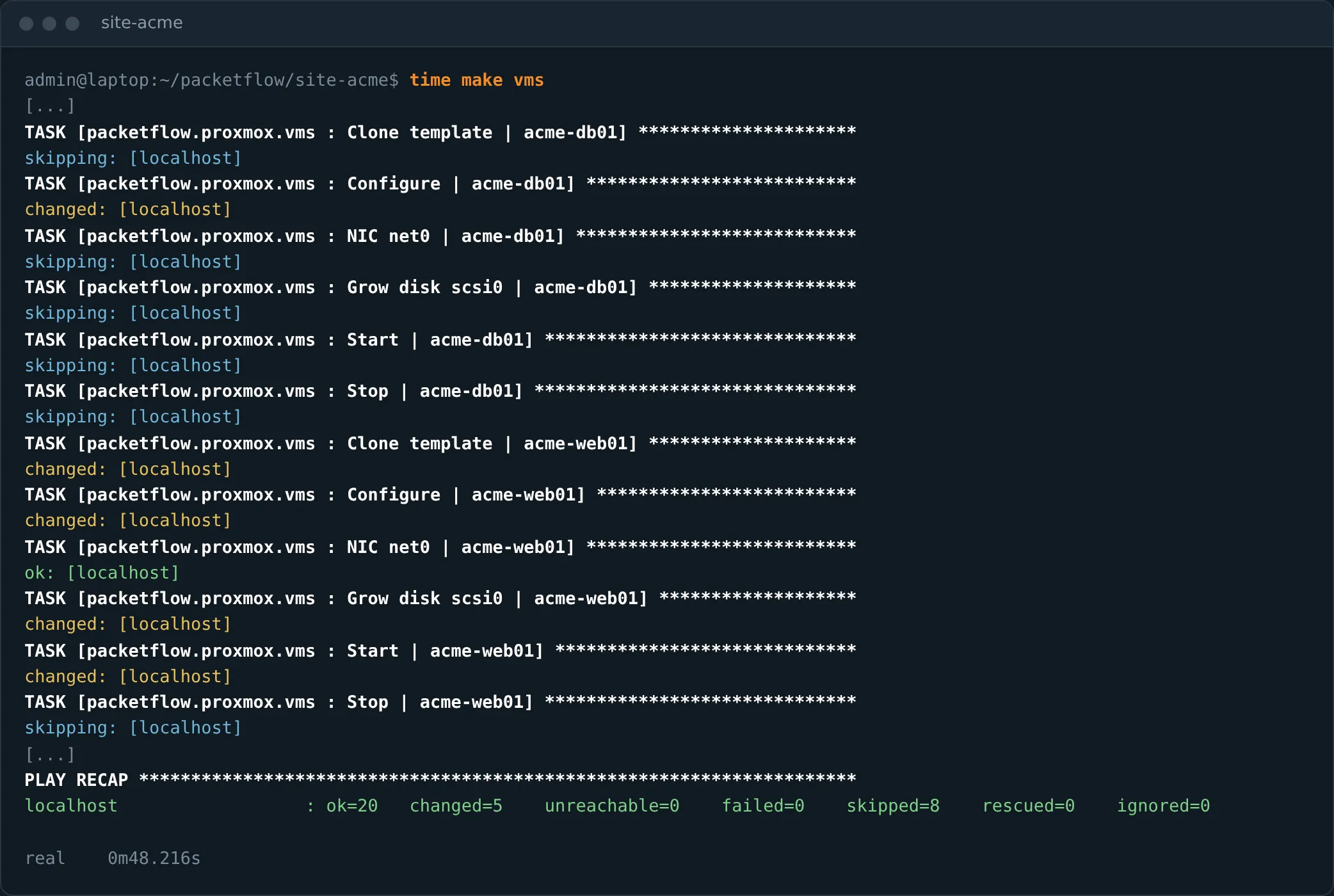
make vms applies the plan. Here it changes the memory of acme-db01 and builds acme-web01 in 48 seconds:
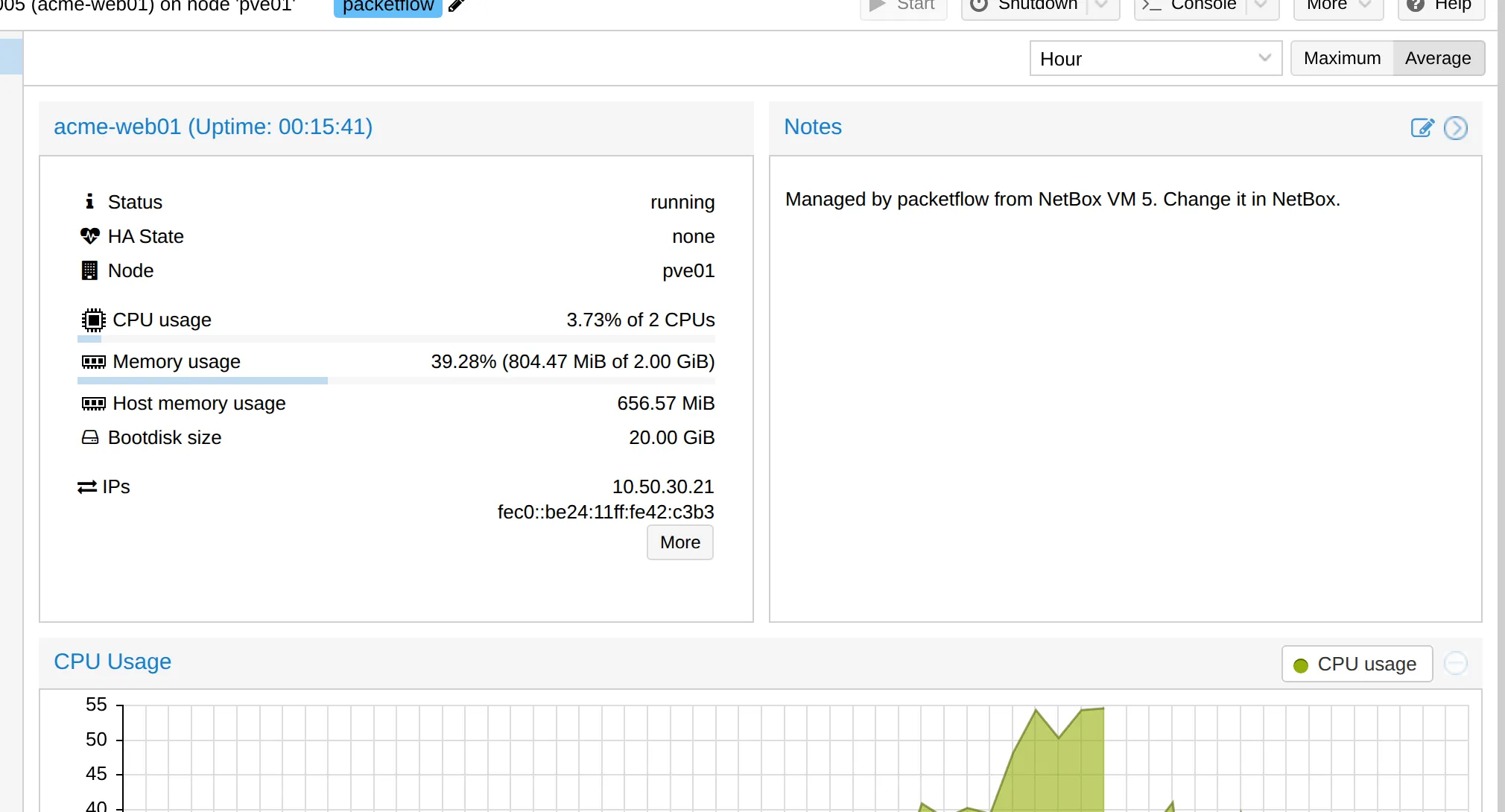
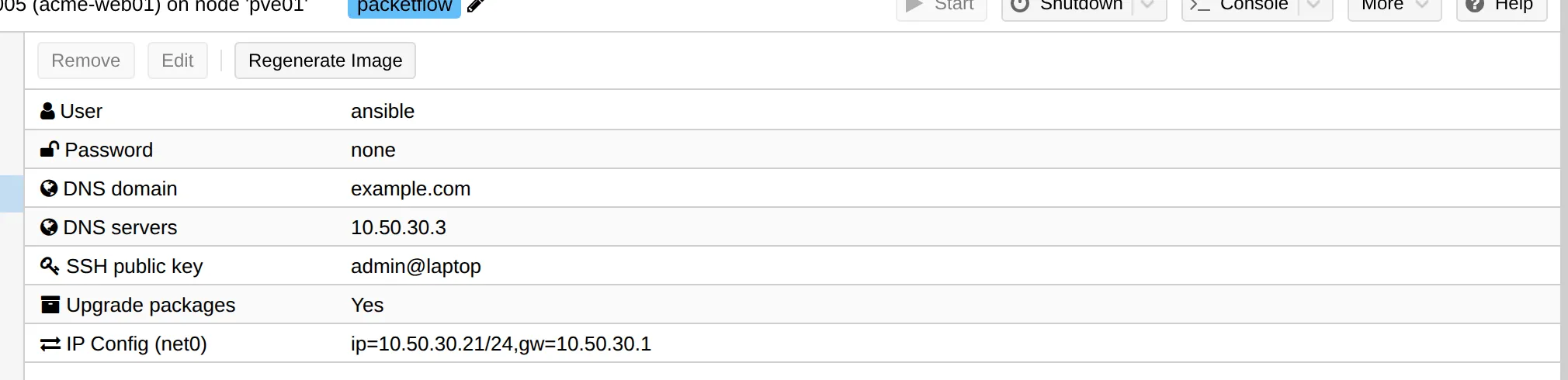
In Proxmox VE the clone has the tag, a note that says where it is managed, and the address from NetBox as reported by the guest agent:
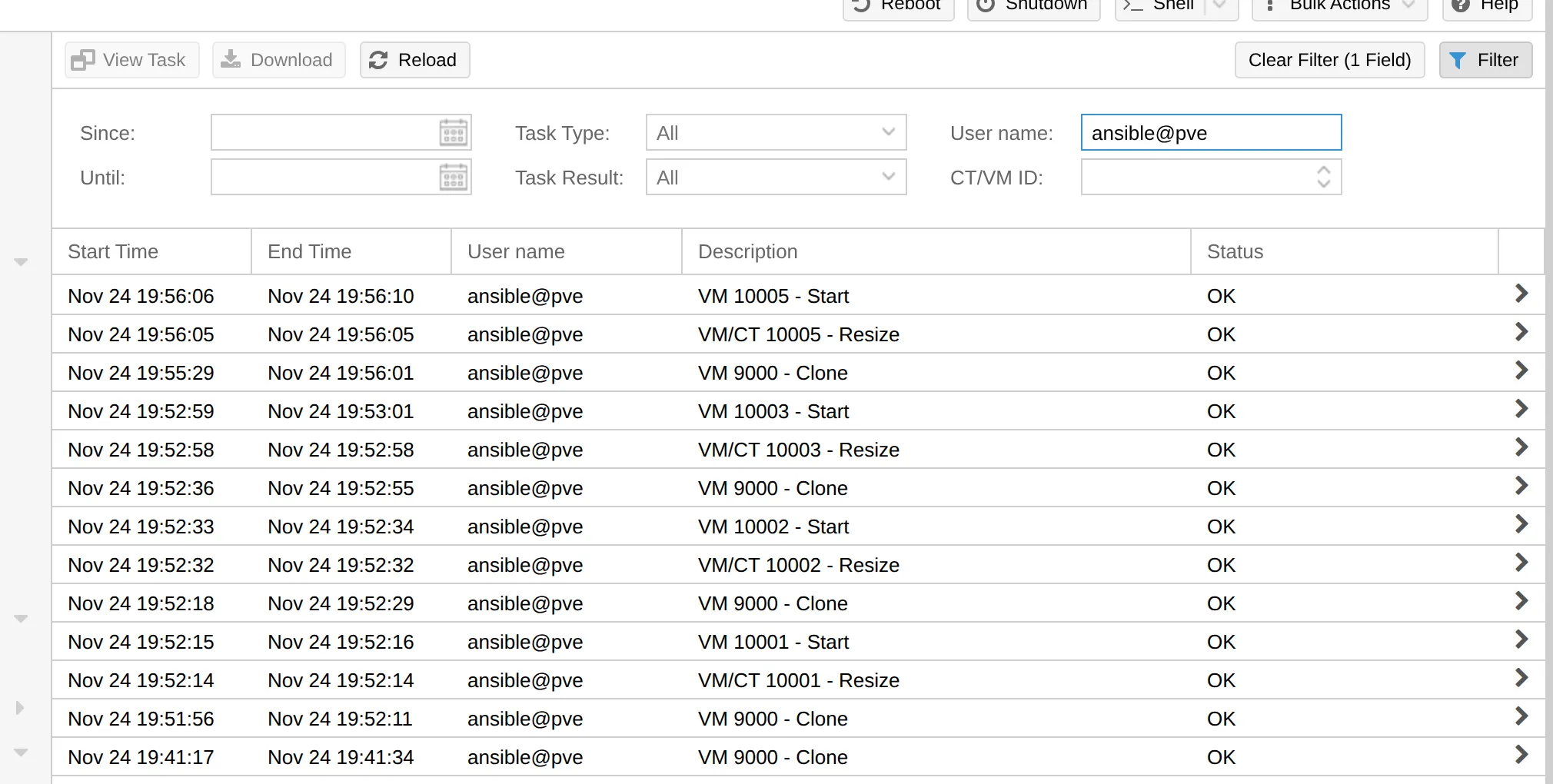
The task history of the node, filtered on the API user, shows what the token did: clones, resizes and starts.
5. Configuration by NetBox role and tag
The Ansible inventory comes from NetBox as well, through the netbox.netbox.nb_inventory plugin. It groups hosts by their role and their tags:
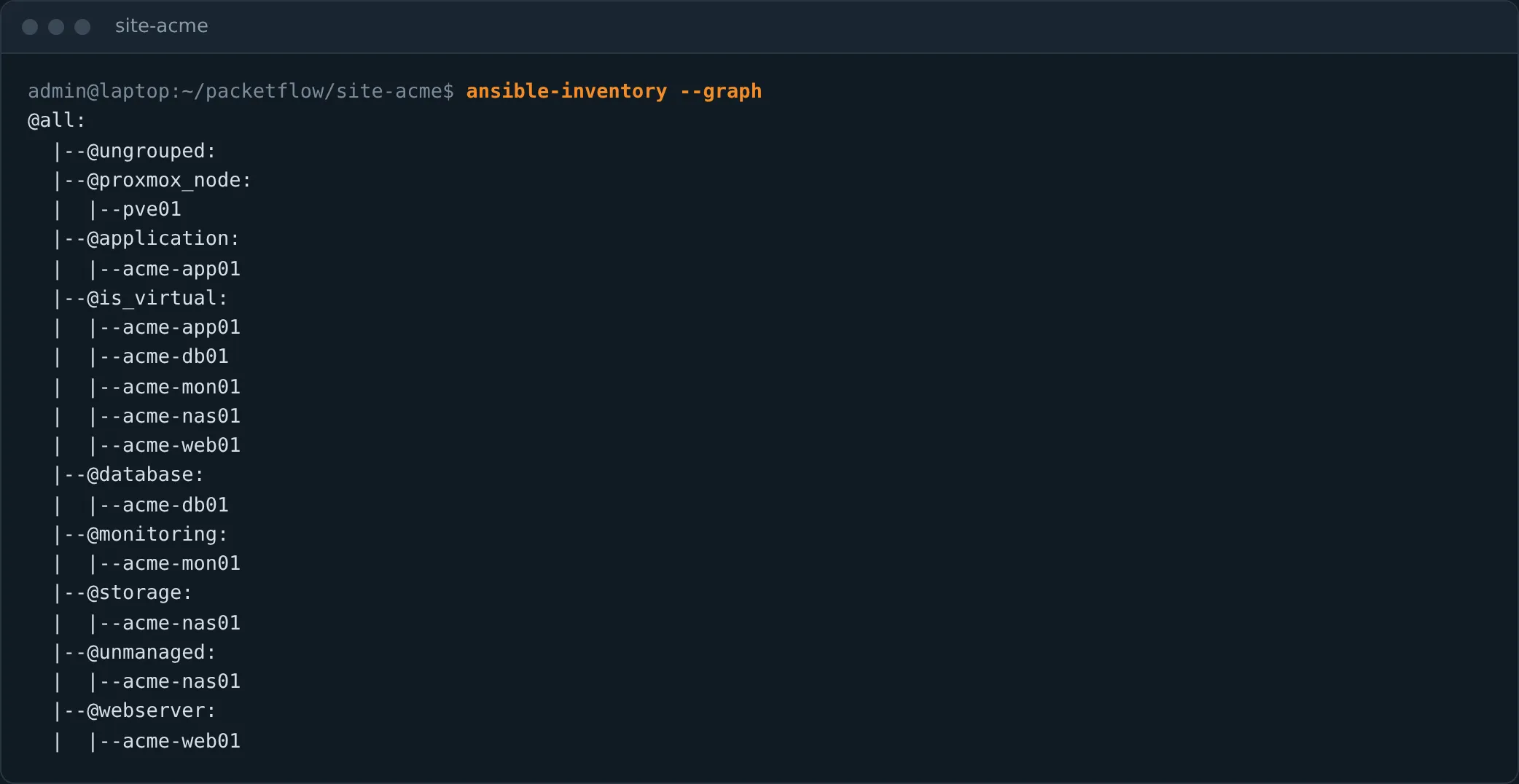
Every play targets one of those groups. Giving a VM a service is setting a role or adding a tag in NetBox and running make ansible:
# playbooks/30-services.yml
- name: Web servers
  hosts: webserver        # every VM with the NetBox role Webserver
  become: true
  roles:
    - my_company.nginx
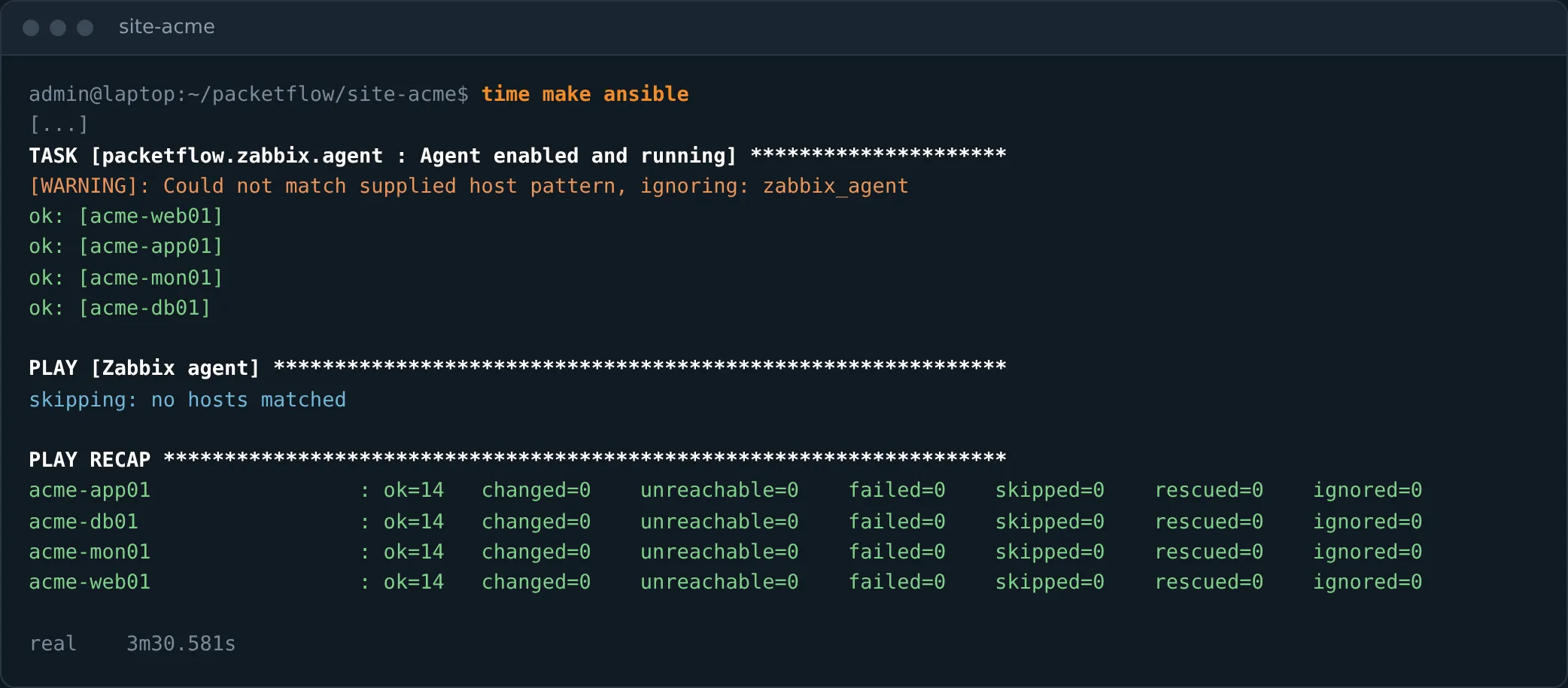
The baseline play runs on all managed VMs. On VMs fresh from the template it has nothing left to change, because the Zabbix agent was already in the image:
What went wrong while building this
A fresh node cannot install packages. A new Proxmox VE install points at the enterprise repository. Without a subscription apt install libguestfs-tools fails. Add a subscription key or switch to the no-subscription repository first.
An interrupted clone blocks the next run. When the API connection dropped during a clone, the half-built VM had no tag yet. The next run refused it: VM ID 10001 is already used by 'acme-app01', which is not managed (no 'packetflow' tag). Refusing to touch it. Deleting the leftover by hand fixed it. The check did what it should.
A configuration change can reset a guest’s identity. Changing a VM’s configuration in Proxmox VE can give cloud-init a new instance ID. At its next boot the guest then behaves like a new machine: Ubuntu generates new SSH host keys and runs the package upgrade again. A drop-in in /etc/cloud/cloud.cfg.d/ with ssh_deletekeys: false keeps the keys.
Proxmox VE accepts more memory than the node has. An 8 GB VM on a lab node with 4 GB was configured without complaint and failed at its next cold start. The plan compares NetBox with Proxmox VE; it does not check the sum against the hardware.
The code
The roles, the site template and the setup guide are in Packetflow-be/proxmox-netbox-ansible on GitHub, under the Apache-2.0 licence. It is a snapshot of the code Packetflow runs, published to show how the parts fit together. The README has the full NetBox mapping, the template build and the job that disables a host in Zabbix when NetBox says it is offline.
For moving existing VMs onto Proxmox VE first, see VMware to Proxmox VE migration: how it works.